

Analytics and tracking · 6 min read

Analytics
Mixpanel's hosted MCP server (US, EU and IN endpoints) lets an AI client run insights, funnel, flow and retention queries, build dashboards, manage cohorts and Lexicon metadata and analyse session replays, after an org admin enables MCP.
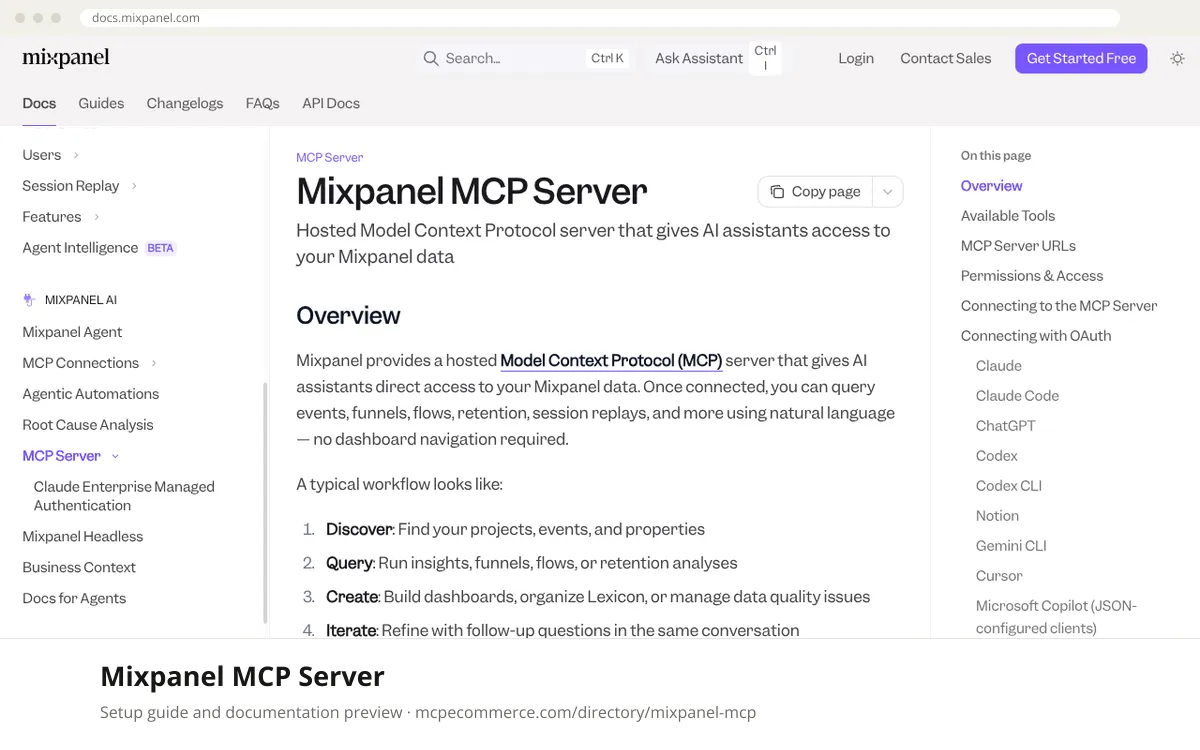
Mixpanel's MCP server is a hosted service that lets an AI assistant work with your Mixpanel project data using plain language. It can run insights, funnel, flow and retention queries. It can also find events and properties, build dashboards, manage cohorts, lookup tables and saved metrics, edit Lexicon metadata, and analyse a user's session replays alongside their events. There are separate endpoints for the US, EU and IN data regions. Because it runs on Mixpanel's side, nothing needs to be installed to host it. This is for product and growth teams that already track events in Mixpanel and want faster answers without clicking through reports. Results depend mostly on how clean your event and property names are, and on whether Lexicon descriptions and business context are filled in. The assistant can only see projects the signed-in user can already access. The tool list includes write actions (dashboards, cohorts, Lexicon edits, deletes), so start with read-only questions and keep changes supervised.
Before anyone connects, an org admin may need to enable MCP in the Mixpanel organization settings. As described in the documentation, accounts created after August 1, 2026 on free and growth plans have it on by default. Everyone else needs an admin to switch it on first. The documentation notes that changes can take up to 15 minutes to apply.
Product and growth teams using Mixpanel for funnel and retention analysis.
https://mcp.mixpanel.com/mcp (US), https://mcp-eu.mixpanel.com/mcp (EU) or https://mcp-in.mixpanel.com/mcp (IN).claude mcp add --transport http mixpanel https://mcp.mixpanel.com/mcp, then run /mcp and finish the browser sign-in.JSON-configured clients, follow the matching section of the vendor documentation. Cursor and Gemini CLI use npx -y mcp-remote with your regional URL. For EU or IN in ChatGPT, enable Developer Mode first.Exact commands and addresses change. Use the official documentation for the current steps.
Installation guide for Mixpanel MCP Server
Client-by-client steps, what to prepare, the first prompts to run and fixes for common errors.
 Claude
 ChatGPT
 Gemini
 Microsoft Copilot
 Perplexity
 CursorClaude Code
Watch out for: Writes appear in the audit log but reads do not, several tools are beta, and there is a 600 requests per hour per user limit.
Usually yes, once. For accounts other than new free and growth accounts created after August 1, 2026, an org admin must enable MCP in the organization AI settings. After that, any user in the organization can connect with their own Mixpanel login. Changes can take up to 15 minutes.
Step-by-step: install Mixpanel MCP Server in Claude, ChatGPT, Gemini, Copilot and more →
Use the endpoint for your region: https://mcp-eu.mixpanel.com/mcp for EU and https://mcp-in.mixpanel.com/mcp for IN. The US endpoint is https://mcp.mixpanel.com/mcp. In Claude, EU and IN users add it as a custom connector. In ChatGPT, they must enable Developer Mode first.
Step-by-step: install Mixpanel MCP Server in Claude, ChatGPT, Gemini, Copilot and more →
No. With OAuth you sign in with your own Mixpanel credentials, so existing project permissions and roles apply. A service account can only reach projects it has been added to. If Verified Mode is on, results still include all requested entities, but unverified ones are flagged.
Questions readers and searchers ask about Mixpanel MCP Server, answered by the site editor from the vendor documentation, plus reader experience. Every comment is reviewed before it appears.
Analytics and tracking · 6 min read
Analytics and tracking · 7 min read

Analytics and tracking · 12 min read
 Read-only
Google · Analytics
An open-source server that lets an assistant read GA4 properties: reports, realtime data and property settings.
View details →
Amplitude · Analytics
Amplitude's remote MCP server (EU variant available) uses OAuth and the user's existing permissions to search charts and dashboards, run segmentation, funnel and retention queries and create or edit charts, cohorts, experiments and feature flags.
View details →
 Read and write
PostHog · Analytics
PostHog's free hosted MCP endpoint (auto-routed to US or EU) lets agents run analytics and HogQL queries, inspect errors and session data, and manage feature flags, experiments and CDP destinations.
View details →