

Advertising · 7 min read

Advertising
TikTok publishes an MCP server page on its Business API portal. Third-party directories describe hosted endpoints with browser OAuth and a large tool set covering campaigns, Smart+ ads, reporting, audiences and catalogs; we could not read the vendor page itself.
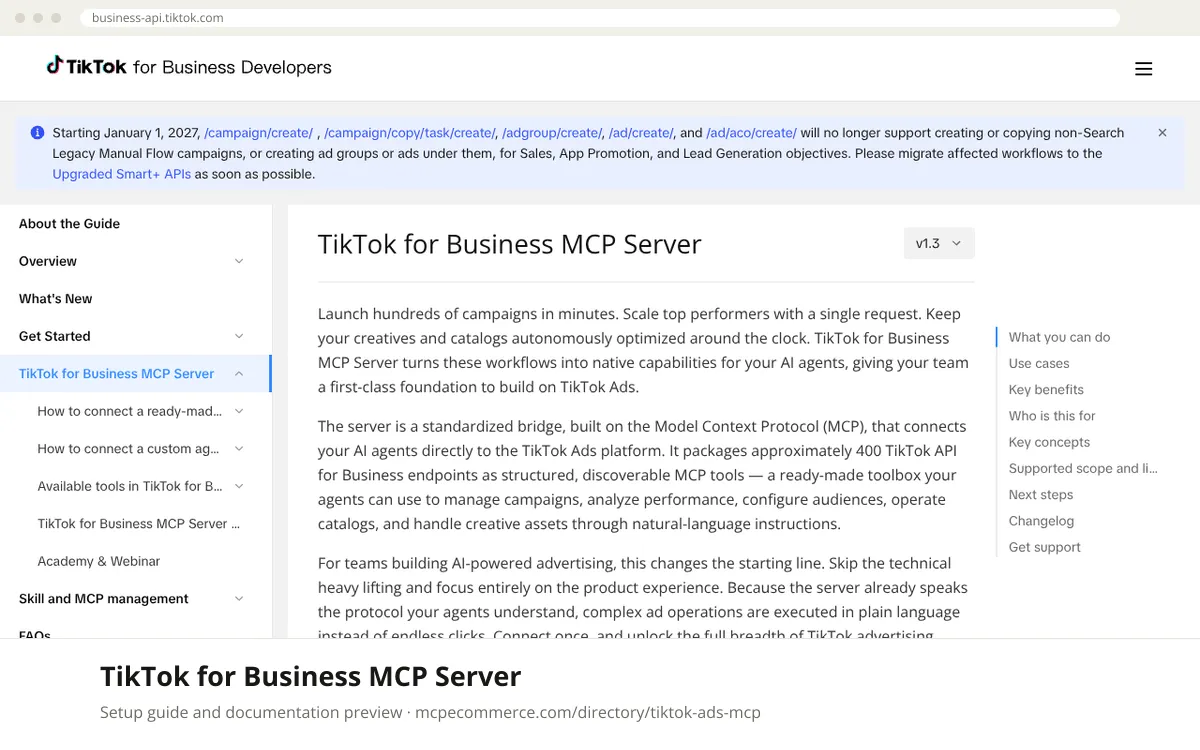
The TikTok for Business MCP Server is a hosted connector from TikTok that lets an AI assistant work with a TikTok Ads account. According to the vendor documentation, it packages about 400 TikTok API for Business endpoints as tools covering Upgraded Smart+ campaigns, ad groups and ads, GMV Max campaigns, reporting, catalogs, creative assets, Custom and Lookalike Audiences, and Business Center administration. The documentation says no developer credential or API key is needed, so a media buyer can ask for reports or changes in plain language. It suits advertisers and agencies that already run TikTok Ads and want reporting and routine edits from an AI client. Results depend on three things: the permissions of the TikTok for Business user who authorizes the connection, how clearly you phrase requests, and how carefully you review any change before it goes live. The documentation lists write tools, including campaign creation and budget changes, so start with reporting only. Our listing is marked unverified because the tool list and connection steps sit on sub-pages we could not read.
Know the limits before you plan around it. The documentation states a rate limit of 6 queries per second per tool per user, and says authorization lasts 30 days before you must reauthorize with the same TikTok for Business account. Tool availability can vary by region and account configuration. The page also warns that from January 1, 2027, some legacy campaign creation endpoints will stop supporting certain Sales, App Promotion and Lead Generation campaigns, and tells users to move to the Upgraded Smart+ APIs.
Media buyers who already run TikTok Ads and want campaign reporting and edits from an AI client.
https://business-api.tiktok.com/portal/docs/tiktok-ads-mcp-server/v1.3 and find the pages titled 'How to connect a ready-made agent' and 'How to connect a custom agent'. Use whichever matches your AI client.Exact commands and addresses change. Use the official documentation for the current steps.
Installation guide for TikTok for Business MCP Server
Client-by-client steps, what to prepare, the first prompts to run and fixes for common errors.
 Claude
 ChatGPT
 Gemini
 Microsoft Copilot
 Perplexity
 CursorClaude Code
Watch out for: Tool list, re-authorization and rate limits come from third-party directories, not from a readable vendor page, so verify before relying on it.
The vendor documentation says no developer credential, API key management or custom code is required. You sign in with your TikTok for Business account through the connection flow and approve access. Follow the vendor connection pages for the exact steps and server URL, because this guide does not state them.
The documentation says user authorization stays valid for 30 days. After that you need to reauthorize the connection using the same TikTok for Business account. If your assistant suddenly stops returning data, an expired authorization is a likely cause, so check it first.
Yes. The documentation describes tools to create, update and manage Upgraded Smart+ campaigns, ad groups, ads and GMV Max campaigns, plus audiences, catalogs and creatives. Treat these as write access. Start with reporting, and review every change before it goes live, since budget edits can affect spend.
Questions readers and searchers ask about TikTok for Business MCP Server, answered by the site editor from the vendor documentation, plus reader experience. Every comment is reviewed before it appears.
Advertising · 7 min read

Advertising · 7 min read
Advertising · 7 min read
 Read-only
Google · Advertising
An open-source server from Google that lets an assistant query Google Ads accounts for reporting and analysis.
View details →
 Read and write
Meta · Advertising
Meta's official connectors let an AI assistant such as Claude or ChatGPT query and manage a Meta ad account through a hosted MCP server, with a CLI alongside it. Announced in April 2026 and in open beta.
View details →
 betaRead and write
Amazon Ads · Advertising
Amazon's MCP server, in open beta since February 2026, lets AI agents call Amazon Ads API functions for campaign management, reporting, account settings and billing, plus prebuilt multi-step workflow tools. Access requires active Amazon Ads API credentials.
View details →