

Analytics and tracking · 6 min read
Support and reviews
Yotpo's first official MCP server exposes its Discover product for content opportunities, content generation and visibility analytics over Streamable HTTP with OAuth 2.0. Reviews and loyalty data are not yet covered; Yotpo says more servers will be added.
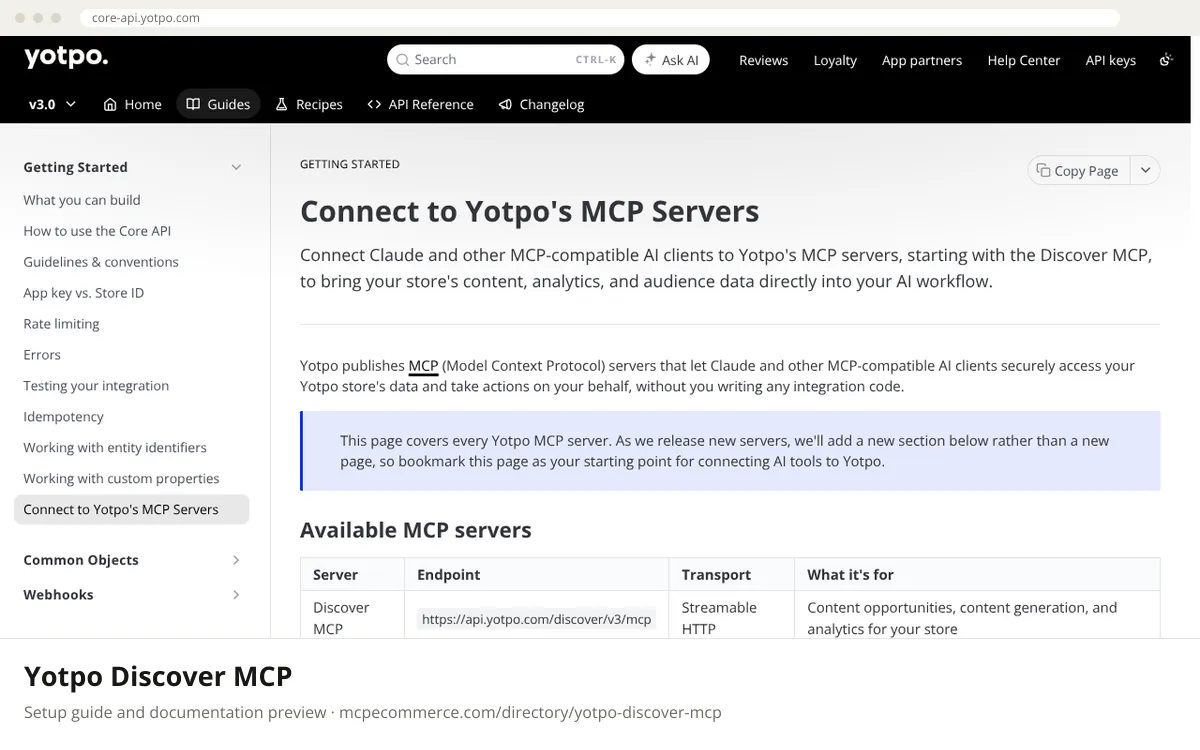
Yotpo Discover MCP is the first official MCP server from Yotpo. It is hosted by Yotpo and lets Claude and other MCP-compatible AI clients work with your store's Discover data. Discover is Yotpo's product for content opportunities, content generation and visibility analytics. Through the server, an AI client can suggest content opportunities by audience, topic, product category and geography. It can also draft content briefs, blog drafts and publisher briefs, and query visibility, traffic-source and shopping-journey analytics. It can run onsite brand and competitor analysis too. This server is for brands and agencies that already use Yotpo Discover and want content planning inside an AI chat. It does not cover reviews or loyalty data. Yotpo says it will add new servers to the same documentation page as they are released. How well it works depends on which Yotpo store you log in with, because all data is scoped to that store. It also depends on how much Discover data the store already has. The documentation describes read access to Discover data, plus the ability to start content generation. Treat generation as the one action that changes things, and supervise it.
Brands using Yotpo Discover who want AI-driven content planning tied to store data.
https://api.yotpo.com/discover/v3/mcp.claude mcp add --transport http yotpo-discover https://api.yotpo.com/discover/v3/mcp. Then run /mcp to check the connection or start the OAuth login.yotpo-discover with the url set to https://api.yotpo.com/discover/v3/mcp under mcpServers. Then follow your client's OAuth flow.Exact commands and addresses change. Use the official documentation for the current steps.
Installation guide for Yotpo Discover MCP
Client-by-client steps, what to prepare, the first prompts to run and fixes for common errors.
 Claude
 ChatGPT
 Gemini
 Microsoft Copilot
 Perplexity
 CursorClaude Code
Watch out for: Only the Discover server is listed today, so do not expect review or UGC tools yet; access is scoped to the store you authenticate with.
Not at the moment. The only server listed in the documentation is the Discover MCP, which covers content opportunities, content generation and analytics. Yotpo says new servers will be added to the same documentation page as they are released, so check that page for updates.
No. The documentation says all Yotpo MCP servers use OAuth 2.0. When you connect, you are redirected to log in to Yotpo and approve access, so there is no API key or token to copy and paste into your AI client.
Step-by-step: install Yotpo Discover MCP in Claude, ChatGPT, Gemini, Copilot and more →
OAuth sessions can expire, so reconnect the server from your client and approve access again. For the wrong store, disconnect and reconnect, logging in with the Yotpo account tied to the store you want. If the problem continues, contact Yotpo support.
Questions readers and searchers ask about Yotpo Discover MCP, answered by the site editor from the vendor documentation, plus reader experience. Every comment is reviewed before it appears.
Analytics and tracking · 6 min read
Analytics and tracking · 7 min read

Analytics and tracking · 12 min read
 Varies by tool
Intercom · Support and reviews
Hosted MCP server that gives AI clients access to Intercom conversations, contacts, companies and Help Center articles. US and EU endpoints are available; AU workspaces are not yet supported.
View details →
Gorgias · Support and reviews
Gorgias hosts an MCP app that lets an external AI assistant read helpdesk tickets, query analytics and audit or change helpdesk and AI Agent settings. It is available on all Helpdesk plans and is in beta.
View details →