
Agency operations
monday.com Platform MCP
monday.com's hosted Platform MCP exposes 60+ tools backed by its GraphQL API for querying boards, creating items and updating columns, using an API token, your own OAuth app or dynamic client registration.
What it is and why it matters
The monday.com Platform MCP is a server hosted and maintained by monday.com. It lets an AI assistant read and write monday.com data through a standard protocol. According to the documentation, it exposes more than 60 tools. These cover boards, groups, items and columns, plus workspaces, folders, docs, dashboards, forms, updates, automations, workflows and sprints. Each tool call runs as a GraphQL API request against your account. For an agency, this means the assistant can pull campaign task lists, create items for a new client project, or change column values without anyone clicking through boards. It suits agencies and in-house teams that already run client projects and campaign tasks in monday.com. Three things decide whether it works well. The first is which sign-in method you pick: an API token, your own OAuth app, or dynamic client registration. The second is how tidy your boards, column names and permissions are. The third is your daily API call limit, because every tool call counts toward it. Because the server can write, start with read-only requests and add changes only when someone is watching.
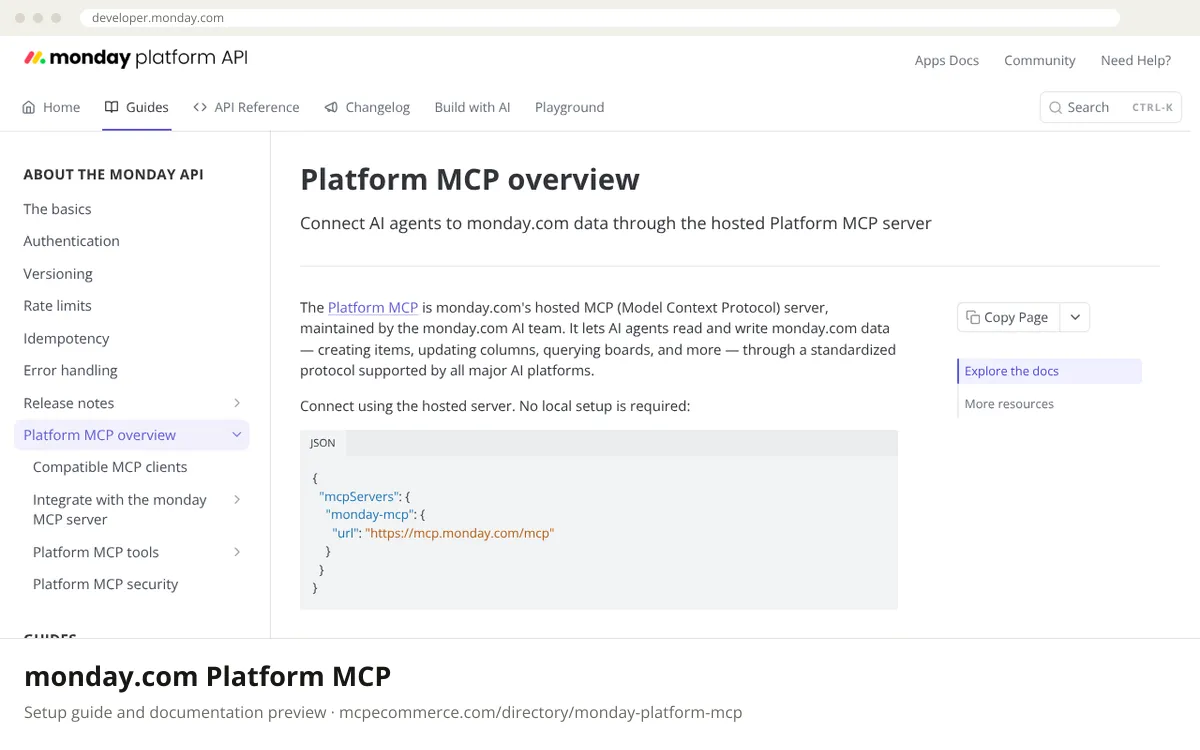
The documentation shows a hosted connection with no local installation. Your AI client points at the vendor's server address. You then choose how to authenticate. Admins can also approve additional connections through dynamic connectors. The documentation lists compatible clients including Claude, ChatGPT, Cursor, Copilot and Gemini. A separate Apps MCP exists for building monday.com apps. It is not the right choice for day-to-day board work.
What it does
- Query boards, groups and items
- Create items and update columns
- Manage workspaces and docs per tool categories
- Each call maps to a GraphQL request
Best for
Agencies running client projects and campaign tasks in monday.com.
How to connect it
- Check that your AI client is on the compatible clients list in the monday.com documentation (Claude, ChatGPT, Cursor, Copilot and Gemini are named).
- Add the hosted server to your client's MCP settings. The documentation gives a server entry named
monday-mcpwith the URLhttps://mcp.monday.com/mcp. No local install is needed. - Pick an authentication path as described in the documentation: an API token, your own OAuth app, or dynamic client registration. For a first trial, use an account or user with limited board access.
- If your organisation needs connections beyond the pre-approved third-party agents, ask a monday.com admin to approve them through dynamic connectors, as described in the documentation.
- Test with a read-only request, such as asking for the items on one board. Confirm the result matches what you see in monday.com before allowing any changes.
- Check the Platform MCP security page and the rate limits page in the documentation before rolling the connection out to a wider team.
Exact commands and addresses change. Use the official documentation for the current steps.
Installation guide for monday.com Platform MCP
Client-by-client steps, what to prepare, the first prompts to run and fixes for common errors.
 Claude
 ChatGPT
 Gemini
 Microsoft Copilot
 Perplexity
 CursorClaude Code
Questions you can ask it
- Show me all items on the Q3 Campaign board that are marked Stuck, grouped by owner.
- List the workspaces I can access and summarise which boards sit in the Client Onboarding workspace.
- Get the updates posted this week on the Website Redesign board and summarise open questions.
- Draft a new item called Landing page copy review on the Client A board and show me the column values you plan to set before creating it.
What it cannot do
- It cannot get around monday.com permissions or limits. Every tool call counts toward the account's daily API call limit.
- It does not cover app development. The separate Apps MCP handles scaffolding, deploying and promoting app versions.
- It does not work with data outside monday.com, such as ad platform or store data, unless other connected tools supply it.
Staying safe
- The server can read and write. Begin with read-only requests, and use a token or OAuth connection tied to a user with the narrowest board and workspace access that works.
- Supervise anything that creates or changes items, columns, docs, automations, workflows or notifications. Ask the assistant to show the planned change first and confirm it before it runs.
- Treat API tokens like passwords. Do not paste them into shared chats or documents. Review the Platform MCP security page, and have an admin control which connections and redirect URIs are approved.
Watch out for: Tool calls count toward the account's daily API limit and a separate Apps MCP exists for app development only.
Frequently asked questions
+Does the monday.com MCP server need to be installed locally?
No. The documentation describes a hosted server run by monday.com, and says no local setup is required. You add the server URL to a compatible AI client's MCP configuration, then sign in with an API token, your own OAuth app, or dynamic client registration.
Step-by-step: install monday.com Platform MCP in Claude, ChatGPT, Gemini, Copilot and more →
+Do MCP calls count toward monday.com API limits?
Yes. The documentation states that MCP tool calls run as GraphQL API requests and count toward your account's daily API call limit. Broad queries over large boards or many bulk changes can use that allowance quickly, so keep requests focused and check the rate limits page.
+What is the difference between the Platform MCP and the Apps MCP?
The Platform MCP works with account data such as boards, items, columns, docs and workspaces. The Apps MCP is a separate server for building monday.com apps, including scaffolding features, deploying code and promoting versions. The documentation says both can run side by side.
Questions and answers
Questions readers and searchers ask about monday.com Platform MCP, answered by the site editor from the vendor documentation, plus reader experience. Every comment is reviewed before it appears.
Other servers to compare
 Varies by tool
Slack MCP Server
Slack · Agency operations
Slack's hosted MCP server uses confidential OAuth tied to a registered Slack app and user-token scopes, letting approved clients search messages and files, read channel and thread history, send messages, manage canvases and lists and upload files.
View details →
 Read and write
Notion MCP
Notion · Agency operations
Notion's hosted MCP server connects via OAuth and lets clients read and update workspace content the user can access, including creating pages, updating pages, commenting and uploading files.
View details →
 Read and write
Airtable MCP Server
Airtable · Agency operations
Airtable's hosted MCP server is available on all plans with OAuth or personal access tokens, letting agents search bases, read and modify records, change schema (for owners and creators) and manage automations that are turned off.
View details →